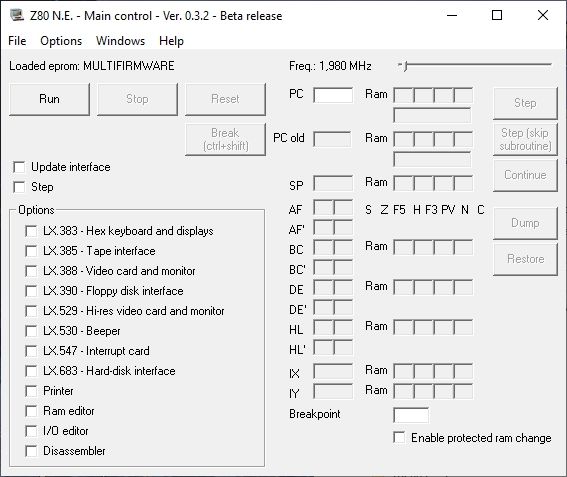
Z80 N.E. EMULATOR

This program is an emulator running on Windows systems for the Nuova Elettronica Z80 computer.
The emulator has been written completely from scratch (including CPU emulation) in Visual Basic 6, and it has the following features:
Emulation of the following cards:
- CPU card - LX.382
- cycle-exact and fully Z80-compliant CPU emulation, including undocumented instructions. It passes all tests of the “Z80All instruction exerciser” program, which verifies every instruction and compares its results with those of a real Z80 CPU
- CPU clock frequency selection from 500 KHz to 50 MHz (beyond 15 MHz an extremely powerful PC is needed, which does not yet exist today)
- ability to select different default eproms to boot
- ability to save and select different custom eprom to boot
- continuous or step-by-step/step-by-step with jumping subroutines execution
- automatic step-by-step mode, with selectable rates from 0.1 to 1000 steps per second
- ability to set a breakpoint
- ability to directly change CPU registers and ram, both in hexadecimal and ASCII format
- ability to load and run any binary file
- disk dump and restore of the emulator status
- hexadecimal keyboard and display interface - LX.383
- hexadecimal keyboard and display - LX.384
- tape interface - LX.385
- support for .wav files at any sampling frequency (.wav files on this site are direcly usable)
- support for two tape recorders
- speed 300/600/1200 bps
- FAST speed mode
- autodetect of reading speed
- .wav files written at 44100 Hz 16 bit
- 64K addressable ram
- ability to define protected ram locations (that is, locations used by the EPROM and not writable), with a customizable configuration for each eprom
- printer interface - LX.389
- video interface - LX.388
- complete support of text and semi-graphic 6 modes
- video graphic and printer interface - LX.529
- complete support of all text and graphics modes
- daughter board with beeper - LX.530
- alphanumeric keyboard - LX.387 (and LX.387-B)
- NOTE: to emulate BREAK keys of the original keyboard use CTRL+SHIFT key combination
- numeric keyboard - LX.549
- floppy disk interface - LX.390
- support four virtual disk drives on image files
- support of .IMD and DMK floppy images (images on this site are directly usable without any conversion)
- printer
- ability to print to video, print to file, or direct print to phisical printer connected to PC
- on-screen emulation of continuous forms or A4 paper
- interrupt card - LX.547
- hard-disk interface - LX.683
And also:
- ram editor
- input/output editor
- integrated disassembler
- automatic online updates check
- storage of various settings with automatic restoration at the next execution
- complete user guide
The emulator architecture is multi-process, so a different .exe is run for each emulated interface. Communication between processes occurs via shared memory maps and inter-process Windows events.
Actually it has been tested on Windows7, Windows 10 and Windows 11.
The emulator, although complete, is currently in BETA version and still under development. Any feedback is extremely welcome and can be sent by writing to info@z80ne.com
Disclaimer:
This software is provided "as is", without warranty of any kind, express or implied.
The author shall not be held liable for any direct or indirect damages, data loss, system malfunction, or any other issues resulting from the use or inability to use this software.
By downloading or using the software, the user agrees that its use is entirely at their own risk.
You can download the emulator installer here (latest version 0.3.26): Download Z80 N.E. emulator installer
The latest version of the user manual is also available here (it is already included in the emulator installer): Z80 N.E. emulator user guide
204